Donner vs MUSTAR Electronic Keyboards: Which Brand Fits You?
As an Amazon Associate we earn from qualifying purchases. Links on this page are affiliate links.
The donner vs MUSTAR electronic keyboard comparison highlights two 61-key beginner options. Both brands target students with full kits including stands and microphones. The main difference lies in their sound engines and connectivity. Donner uses a standard LCD interface with a companion app, while MUSTAR features lighted keys and USB MIDI for direct device connection. You must decide which teaching style fits your practice routine best.
Key differences
| Aspect | Donner 61-Key Beginner Keyboard Kit | MUSTAR 61-Key Lighted Keyboard Kit |
|---|---|---|
| Preset Sounds | 249 voices | 600 tones |
| Connectivity | 3.5mm jack | USB MIDI |
| Power Source | Power adapter | Adapter and battery power |
| Special Features | LCD display | Lighted keys |
| Weight | 9.92 pounds | 15 pounds |
Which one should you choose?
Choose Donner 61-Key Beginner Keyboard Kit if
- You prefer a lighter, more portable kit for easy transport.
- You want to use the Donner Music APP for structured learning courses.
- You only need a power adapter for home practice.
Choose MUSTAR 61-Key Lighted Keyboard Kit if
- You benefit from visual guidance via lighted keys for faster learning.
- You need USB MIDI connectivity to connect with a computer or smartphone.
- You require battery power for outdoor playing or party use.
Verdict: Choose the Donner kit if you prioritize portability and structured app-based lessons. Select the MUSTAR model if you need visual key guides and direct USB connectivity for digital integration. Both provide comprehensive starter packages for new players.
Donner vs MUSTAR Keyboard Comparison
Sound Library Size
MUSTAR offers a significantly larger library of preset sounds. It provides 600 tones and 500 rhythms, giving you more variety for different musical styles. Donner includes 249 voices and 249 rhythms. While Donner’s selection is sufficient for basic practice, MUSTAR’s extensive catalog allows for more creative exploration. If you want to experiment with many different instrument sounds without external tools, MUSTAR has the clear advantage here.
Connectivity Options
Connectivity differs between the two models. MUSTAR features USB MIDI, allowing you to connect to a smartphone or computer for app-based teaching or digital audio workstation use. It also includes a USB OTG cable. Donner relies on a 3.5mm jack for audio output and connects via a dedicated Donner Music APP. MUSTAR’s USB MIDI support offers more versatile integration with modern devices and recording software compared to Donner’s audio-focused connection.
Included Accessories
Both brands provide comprehensive beginner kits. Donner includes a stand, adjustable-height bench, music stand, microphone, and power adapter. MUSTAR provides a stand, music rest, sustain pedal, headphone, microphone, power adapter, and USB OTG cables. MUSTAR includes a sustain pedal and headphones in the box, which are often sold separately. Donner includes a bench, which MUSTAR does not list. MUSTAR edges ahead by including essential performance accessories like the pedal and headphones.
Power Supply Flexibility
Power options vary between the two keyboards. MUSTAR supports both a power adapter and battery power, offering flexibility for outdoor play or locations without easy access to outlets. Donner uses only a power adapter. If you plan to move your keyboard frequently or play in settings without reliable electricity, MUSTAR’s dual power source is a practical advantage. For stationary home use, this difference matters less.
Teaching Features
Both keyboards include teaching modes to help beginners learn. MUSTAR features lighted keys and three specific modes: One Key, Follow, and Ensemble. These visual cues can speed up the learning process for new players. Donner includes three teaching functions and connects to an app with structured courses. MUSTAR’s lighted key system provides immediate visual feedback on the keyboard itself, which can be more intuitive for some learners than relying solely on an app or generic functions.
Which Donner or MUSTAR Keyboard Fits You
You want a complete kit with built-in speakers
The Donner DEK-610S includes two 10W built-in speakers for room-filling sound without extra gear. It comes with a stand, bench, music stand, microphone, and power adapter. This all-inclusive package provides everything you need to start playing immediately, making it a convenient choice for beginners who want a ready-to-use setup.
You need battery power for outdoor play
The MUSTAR keyboard supports both adapter and battery power sources. This dual power option allows you to play outdoors or at parties without needing a wall outlet. It also features a sustain pedal and USB MIDI connectivity for connecting to smartphones or computers, offering flexibility for portable practice sessions and digital integration.
You prefer lighted keys for learning
The MUSTAR model features lighted keys and intelligent teaching modes like One Key, Follow, and Ensemble. These functions help beginners get started quickly by visually guiding your fingers. It also offers 600 tones and 65 demo songs, providing a rich learning environment with visual aids that make mastering new songs easier and more engaging.
You want a lighter, more portable unit
The Donner keyboard weighs only 9.92 pounds, making it significantly lighter than the MUSTAR option. Its slim body design enhances portability for indoor or outdoor activities. If you plan to move your instrument frequently or have limited storage space, the lighter weight and compact dimensions of the Donner unit offer greater convenience.
The products compared

Donner 61-Key Beginner Keyboard Kit
Best for: Beginners seeking a complete keyboard kit
- Number of Keys
- 61
- Preset Sounds
- 249 voices
- Built-In Speakers
- Two 10W speakers
- Connectivity
- 3.5mm jack
- Power Source
- Power adapter
- Included Accessories
- Stand, bench, music stand, microphone
View on Amazon: Donner 61-Key Beginner Keyboard Kit Affiliate link
This Donner 61-key electric piano comes as a full kit with a stand, bench, music stand, and microphone. It features 249 voices, 249 rhythms, and 32-note polyphony. Two 10W speakers provide room-filling sound. The LCD display shows current functions. You get access to learning courses via the Donner Music APP. This package suits beginners who want an all-in-one setup for practice and performance.
Pros
- Includes stand, bench, music stand, and microphone
- Two 10W built-in speakers
- 249 voices and 249 rhythms
- LCD display for function control
- Access to Donner Music APP courses
Cons
- Only 32-note polyphony limits complex chords
- No Bluetooth connectivity listed
- Uses 3.5mm jack for headphones
Good fit if
- You want a complete kit with stand and bench
- You are a beginner needing guided lessons
- You prefer physical controls on an LCD display
Skip if
- You need high polyphony for advanced repertoire
- You require wireless Bluetooth connections
- You want a compact travel keyboard only
Verdict: Donner 61-Key Keyboard with Stand Kit provides a complete beginner setup with 249 voices and included accessories. It fits learners who value bundled hardware and app-guided instruction over wireless features.
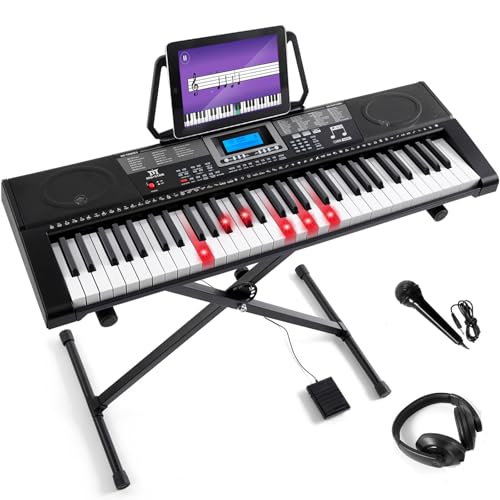
MUSTAR 61-Key Lighted Keyboard Kit
Best for: beginners using lighted keys and teaching modes
- Number of Keys
- 61
- Sound Engine
- DREAM source
- Preset Sounds
- 600 tones
- Built-In Speakers
- 2 stereo speakers
- Connectivity
- USB MIDI
- Power Source
- Adapter, battery
View on Amazon: MUSTAR 61-Key Lighted Keyboard Kit Affiliate link
The MUSTAR 61-key keyboard uses a DREAM sound engine with 600 tones and 500 rhythms. It features lighted keys and three teaching modes to help beginners learn. The unit includes two stereo speakers, a sustain pedal, and a microphone. You can connect it via USB MIDI for app integration. It runs on adapter or battery power for portable use.
Pros
- 61 keys with lighted-up function for guided learning
- Three teaching modes: One Key, Follow, and Ensemble
- 600 tones and 500 preset rhythms
- Dual Voice and Double Keyboard modes
- USB MIDI connectivity for app control
Cons
- 61 keys limit range compared to 88-key models
- Plastic construction feels less premium than wood
- No Bluetooth connectivity mentioned in specs
Good fit if
- You are a beginner needing visual key guidance
- You want a portable keyboard for travel
- You prefer battery power for outdoor use
Skip if
- You require a full 88-key hammer action
- You need built-in Bluetooth wireless audio
- You are an advanced player seeking complex polyphony
Verdict: MUSTAR 61-Key Lighted Learning Keyboard is a solid entry-level option for students who benefit from lighted keys and structured teaching modes. It suits those who need portability and app connectivity over professional stage features.
Specifications side by side
| Spec | Donner 61-Key Beginner Keyboard Kit | MUSTAR 61-Key Lighted Keyboard Kit |
|---|---|---|
| Number of Keys | 61 | 61 |
| Sound Engine | not stated | DREAM source |
| Preset Sounds | 249 voices | 600 tones |
| Built-In Speakers | Two 10W speakers | 2 stereo speakers |
| Connectivity | 3.5mm jack | USB MIDI |
| Power Source | Power adapter | Adapter, battery |
| Included Accessories | Stand, bench, music stand, microphone | Stand, pedal, mic, headphones, cables |
| Target Audience | Beginners | Beginners |
| Color | Black | Black |
| Special Features | not stated | Built-In Speakers, Lighted Keys |
| Dimensions | 12 × 37 × 3.54 inches | 12 × 36.6 × 38 inches |
| Weight | 9.92 pounds | 15 pounds |
| Size | Full | Full Size 61 Keys Piano |
| Model | 610S | MEKS-500 |
Frequently asked questions
Does the Donner 61-Key Beginner Keyboard Kit have lighted keys?
No. The Donner 610S model does not feature lighted keys. It relies on a standard LCD interface and app-guided instruction for learning. The MUSTAR MEKS-500, by contrast, includes lighted keys to help beginners follow along visually. If you need visual cues on the keys, the MUSTAR option is the better choice.
Which keyboard offers more built-in sounds and rhythms?
The MUSTAR MEKS-500 offers more sounds. It includes 600 tones and 500 rhythms. The Donner 610S provides 249 voices and 249 rhythms. Both selections are sufficient for beginners, but MUSTAR gives you nearly double the variety for exploring different musical styles and practicing with accompaniment.
Is the Donner 61-Key Keyboard Kit portable?
Yes, it is relatively portable. The Donner 610S weighs 9.92 pounds. It measures 37 inches wide and 12 inches long. This makes it easier to move than the MUSTAR MEKS-500, which weighs 15 pounds. Both are full-size 61-key layouts, but Donner is lighter for transport.
Do both brands include a stand in the kit?
Yes. Both the Donner 610S and the MUSTAR MEKS-500 are sold as complete beginner kits. Each package includes a stand, along with other accessories like microphones and power adapters. You do not need to purchase separate hardware to set up either keyboard for immediate use.
Which keyboard is better for structured teaching modes?
The MUSTAR MEKS-500 is designed for structured learning. It features teaching modes that help students learn step-by-step. It also includes lighted keys to guide your fingers. The Donner 610S focuses on bundled hardware and app guidance rather than built-in teaching modes or visual key lighting.
What are the physical dimensions of these keyboards?
Both are 12 inches in depth. The Donner 610S is 37 inches wide and 3.54 inches high. The MUSTAR MEKS-500 is 36.6 inches wide and 38 inches high. The MUSTAR unit is taller, likely due to its stand integration, while the Donner unit is a lower profile console.