MUSTAR vs Best Choice Products Electronic Keyboards: Which Brand Fits You?
As an Amazon Associate we earn from qualifying purchases. Links on this page are affiliate links.
This MUSTAR vs best choice products electronic keyboard comparison helps you decide between two 61-key beginner sets. Both models feature lighted keys and teaching modes to help new players learn. The main difference lies in their sound engines and included bundles. MUSTAR offers more tones and rhythms with a sustain pedal, while Best Choice Products includes a padded stool and an LCD screen. You should choose based on whether you prioritize sound variety or a complete seating setup.
Key differences
| Aspect | MUSTAR 61-Key Lighted Keyboard Kit | Best Choice Products 61-Key Lighted Keyboard |
|---|---|---|
| Preset Sounds | 600 tones | 255 timbres |
| Rhythms | 500 present rhythms | 255 rhythms |
| Display | not listed | LCD Screen |
| Included Accessories | Stand, pedal, headphone, mic | H-stand, padded stool, headphones |
| Power Source | Adapter and battery power | not listed |
Which one should you choose?
Choose MUSTAR 61-Key Lighted Keyboard Kit if
- You want a wider selection of 600 tones and 500 rhythms for diverse playing styles.
- You need battery power for portable outdoor practice sessions.
- You prefer a bundle that includes a microphone and sustain pedal.
Choose Best Choice Products 61-Key Lighted Keyboard if
- You want a complete setup that includes a padded stool for comfortable seating.
- You value an LCD screen to help navigate settings and modes easily.
- You are looking for a keyboard with 32 types of keyboard percussion.
Verdict: Choose MUSTAR if you prioritize a larger sound library and portable battery operation. Pick Best Choice Products if you need a padded stool for your practice space and want the clarity of an LCD display.
MUSTAR vs Best Choice Products Specs
Number of keys
Both the MUSTAR MEKS-500 and the Best Choice Products SKY7174 feature 61 keys. This standard layout provides a balanced range for beginners who are learning chords and melodies. The 61-key format is compact enough for small spaces while offering enough range for basic repertoire. Since both models share this identical key count, there is no functional difference in the playable range. You get the same physical interface for your practice sessions regardless of which brand you choose.
Preset sounds
MUSTAR provides a significantly larger library of sounds with 600 tones. This gives you more variety for experimentation and different musical styles. In contrast, the Best Choice Products keyboard offers 255 timbres. While this is a solid number for a beginner, it is less than half of what MUSTAR offers. If you enjoy switching between many different instrument voices during your practice, the MUSTAR model provides more options to explore without needing external sounds.
Included accessories
The bundles differ in composition. MUSTAR includes a sustain pedal, music rest, stand, headphone, microphone, and power adapter. The Best Choice Products set provides an H-style stand, a padded stool, headphones, and a music stand. The Best Choice Products bundle is notable for including a padded stool, which MUSTAR does not list as included. MUSTAR includes a microphone, which is absent from the Best Choice Products bundle. Your choice depends on whether you prioritize a stool or a microphone.
Display and controls
The Best Choice Products keyboard features an LCD screen. This display helps you view settings, rhythm data, and recording status clearly. The MUSTAR model does not mention an LCD screen in its specifications. MUSTAR relies on a joystick for real-time control and lighted keys for guidance. For users who prefer visual feedback on their current mode or settings, the Best Choice Products display is a practical advantage. MUSTAR users must rely on other indicators for status updates.
Connectivity
MUSTAR supports USB MIDI connectivity. This allows you to connect the keyboard to a smartphone or computer for app-based teaching or music software. The Best Choice Products keyboard lists a USB port for playing songs stored on a drive. It does not explicitly mention MIDI connectivity for computer integration. If you plan to use your keyboard with digital audio workstations or learning apps on a computer, the MUSTAR USB MIDI connection is the more versatile option for modern workflows.
Which 61-Key Keyboard Fits Your Needs
Beginners wanting extensive sound variety and teaching modes
The MUSTAR MEKS-500 includes 600 tones, 500 rhythms, and 65 demo songs. It features three teaching modes, including One Key and Ensemble, to help you learn. The DREAM sound engine and sustain pedal provide richer audio. You also get dual voice mode to combine sounds, enhancing your practice sessions with more sonic options.
Players needing an LCD screen and full bundle
Best Choice Products offers an LCD display for easier navigation of settings. It includes 255 timbres and 255 rhythms for solid variety. The package comes with a padded stool and H-style stand, making setup immediate. The light-up keys and recorder with playback assist in learning music notation and tracking your progress effectively.
Users needing portable power via batteries
MUSTAR supports both adapter and battery power, allowing you to play anywhere without needing an outlet. It connects via USB MIDI to computers or smartphones for app-based teaching. The joystick allows real-time control for effects like vibrato and sustain. This flexibility makes it ideal for practicing in different locations or outdoor settings.
Budget-conscious buyers wanting a complete starter kit
Best Choice Products includes a music stand, padded stool, and stand in the box. It features 50 demo songs and a tempo starting at 120 BPM. The USB port lets you play along with stored songs. The 32 types of keyboard percussion add variety to your playing, providing a comprehensive learning experience for new musicians.
The products compared
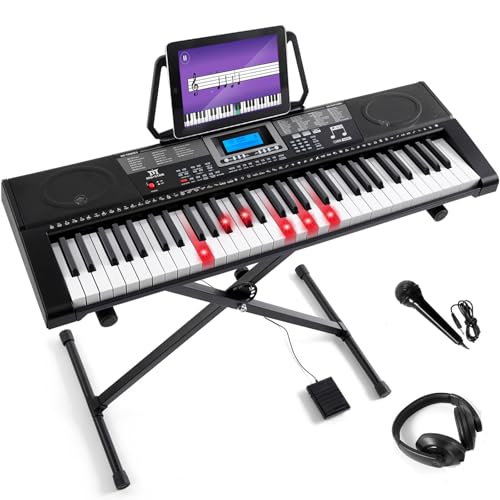
MUSTAR 61-Key Lighted Keyboard Kit
Best for: Beginners seeking lighted key guidance
- Number of Keys
- 61
- Sound Engine
- DREAM source
- Preset Sounds
- 600 tones
- Built-In Speakers
- 2 stereo speakers
- Connectivity
- USB MIDI
- Power Source
- Adapter, battery
View on Amazon: MUSTAR 61-Key Lighted Keyboard Kit Affiliate link
The MUSTAR MEKS-500 is a 61-key electronic keyboard featuring lighted keys and three teaching modes. It includes 600 tones, 500 rhythms, and 65 demo songs powered by a DREAM sound engine. The unit connects via USB MIDI and supports dual voice and dual keyboard modes. It runs on adapter or battery power and weighs 15 pounds.
Pros
- Lighted keys with three teaching modes
- 600 tones and 500 preset rhythms
- USB MIDI connectivity for apps
- Dual voice and dual keyboard modes
- Battery or adapter power options
Cons
- Only 61 keys, not full size
- Plastic build limits durability
- No Bluetooth wireless connectivity
Good fit if
- You need lighted keys for learning
- You want portable battery power
- You prefer wired USB MIDI
Skip if
- You require a full 88-key piano
- You need wireless Bluetooth control
- You want premium weighted keys
Verdict: MUSTAR 61-Key Lighted Learning Keyboard offers essential teaching features and portable power for beginners who value visual guidance over professional key action.
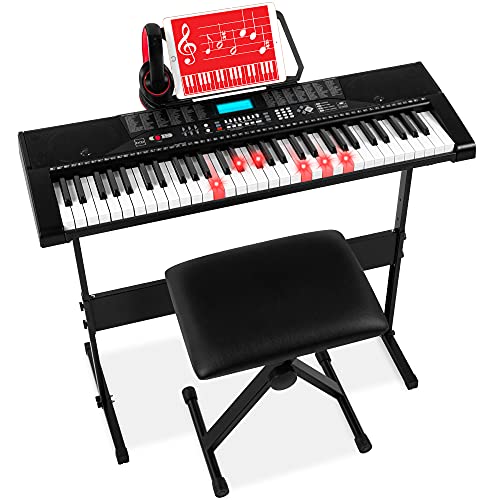
Best Choice Products 61-Key Lighted Keyboard
Best for: beginners wanting a complete starter bundle
- Number of Keys
- 61
- Preset Sounds
- 255 timbres
- Built-In Speakers
- Built-in speakers
- Connectivity
- USB port
- Included Accessories
- Stand, bench, headphones, music stand
- Target Audience
- Beginners
View on Amazon: Best Choice Products 61-Key Lighted Keyboard Affiliate link
This Best Choice Products keyboard offers 61 keys with 255 timbres and 255 rhythms. It includes an LCD screen, light-up keys, and a recorder for learning. The bundle provides a stand, padded stool, and headphones. It features a USB port for external audio. This set suits beginners who want a complete starter package with teaching modes like One-Key and Follow.
Pros
- Includes stand, stool, and headphones
- 255 timbres and 255 rhythms
- Light-up keys and LCD display
- USB port for connectivity
- Three teaching modes available
Cons
- Only 61 keys limit range
- No Bluetooth connectivity listed
- Heavier at 17.2 pounds
Good fit if
- You want a complete bundle with stand and stool
- You are a beginner needing light-up keys
- You prefer wired USB connectivity
Skip if
- You need a full 88-key weighted action
- You require Bluetooth wireless streaming
- You want a lightweight portable unit
Verdict: Best Choice Products 61-Key Keyboard Set is a practical starter bundle for beginners who need included accessories and visual learning aids. It fits those who prioritize a complete package over advanced portability or wireless features.
Specifications side by side
| Spec | MUSTAR 61-Key Lighted Keyboard Kit | Best Choice Products 61-Key Lighted Keyboard |
|---|---|---|
| Number of Keys | 61 | 61 |
| Sound Engine | DREAM source | not stated |
| Preset Sounds | 600 tones | 255 timbres |
| Built-In Speakers | 2 stereo speakers | Built-in speakers |
| Connectivity | USB MIDI | USB port |
| Power Source | Adapter, battery | not stated |
| Included Accessories | Stand, pedal, mic, headphones, cables | Stand, bench, headphones, music stand |
| Target Audience | Beginners | Beginners |
| Color | Black | Black |
| Special Features | Built-In Speakers, Lighted Keys | Built-In Speakers, Lighted Keys, LCD Screen |
| Dimensions | 12 × 36.6 × 38 inches | 36.4 × 12 × 3.7 inches |
| Weight | 15 pounds | 17.2 pounds |
| Size | Full Size 61 Keys Piano | 61-Key |
| Model | MEKS-500 | SKY7174 |
Frequently asked questions
Does MUSTAR have lighted keys?
Yes, the MUSTAR 61-Key Lighted Keyboard Kit features lighted keys as a special feature. This visual guidance helps beginners identify notes while learning. The kit is designed to support new players who benefit from seeing which keys to press during lessons or practice sessions.
Does Best Choice Products have lighted keys?
Yes, the Best Choice Products 61-Key Lighted Keyboard includes lighted keys. This feature provides visual cues to help you learn songs. It also includes an LCD screen and built-in speakers, making it a complete starter bundle for those who want all necessary components included in one package.
Which keyboard is lighter?
The MUSTAR model is lighter at 15 pounds. The Best Choice Products model weighs 17.2 pounds. If portability is important to you, the MUSTAR keyboard is easier to carry. Both models are compact 61-key instruments suitable for home use or small spaces.
What are the dimensions of the MUSTAR keyboard?
The MUSTAR MEKS-500 measures 36.6 inches in width, 12 inches in length, and 38 inches in height. It weighs 15 pounds. These dimensions provide a standard full-size 61-key layout that fits well on desks or stands while remaining manageable for storage when not in use.
What are the dimensions of the Best Choice Products keyboard?
The Best Choice Products SKY7174 measures 36.4 inches in length, 12 inches in width, and 3.7 inches in height. It weighs 17.2 pounds. The lower profile makes it sit flat on surfaces. The 61-key size is ideal for beginners needing a compact instrument.
Does Best Choice Products have an LCD screen?
Yes, the Best Choice Products 61-Key Lighted Keyboard features an LCD screen. This display helps you navigate settings and view information while playing. It also includes built-in speakers and lighted keys, offering a comprehensive learning experience for beginners who want visual feedback and audio output.
Is MUSTAR good for beginners?
Yes, the MUSTAR 61-Key Lighted Keyboard Kit is designed for beginners. It offers lighted key guidance to help you learn notes easily. The portable design and essential teaching features make it suitable for new players who value visual aids and convenience over advanced professional key actions.
Is Best Choice Products good for beginners?
Yes, the Best Choice Products 61-Key Keyboard Set is a practical starter bundle for beginners. It includes lighted keys and an LCD screen to aid learning. The package is ideal for those who want a complete set with included accessories rather than focusing on advanced portability or wireless features.